

Overview
SL NEO Live Short Delay is a professional live broadcast delay and content-moderation solution designed to prevent unwanted audio or video from reaching air. It provides a configurable safety buffer — commonly used as a profanity delay or seven-second delay — giving operators time to react before sensitive or inappropriate content is transmitted.
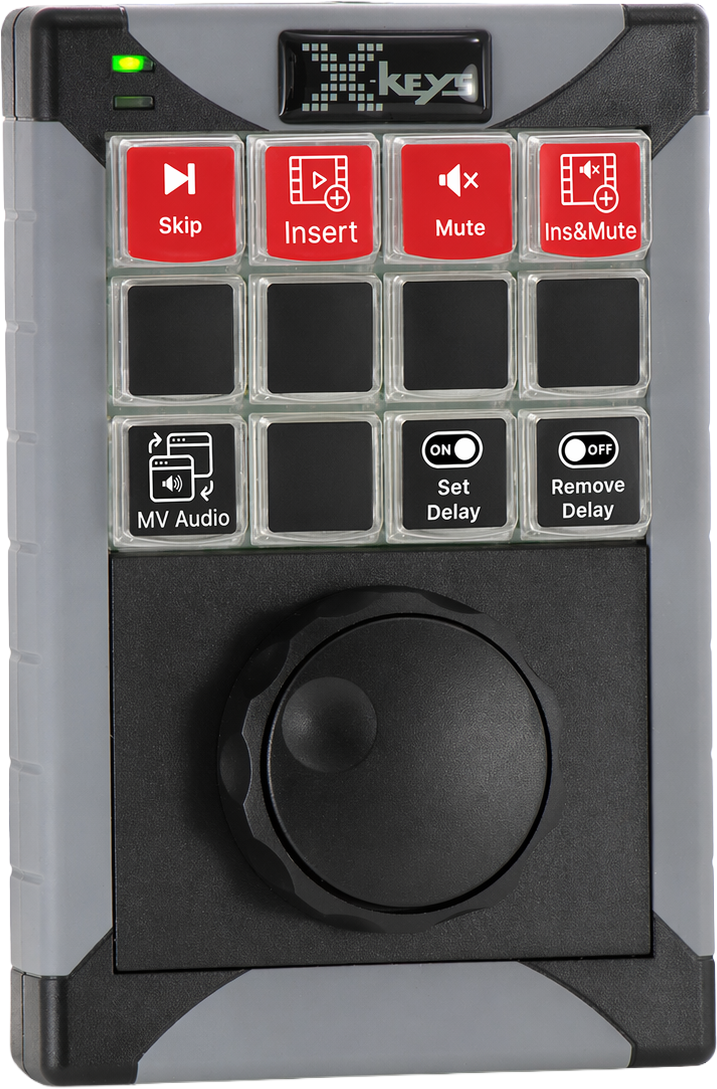
The system records and plays back uncompressed audio and video directly from server RAM, providing a low-latency delay from 1 second to 10 minutes while preserving original signal quality. Operators can control the delay using hotkeys, configurable X-Keys panels, or GPI commands.
When an incident occurs, the operator can apply real-time protection actions including video blur, blackout, replacement, audio mute, beep, jingle, or file playback. SL NEO Live Short Delay supports SDI, ASI, and IP workflows and is designed for live news, entertainment, sports, webcasts, and other productions where immediate editorial intervention may be required.

Highlights
Delay Buffer Playback
Key Features
- Real-time live protection
- ▸ Short-delay operation for live broadcasts and webcasts
- ▸ Immediate blocking of unwanted on-air moments
- ▸ Optimized for «classic» live production where longer editorial delay is not possible
- High-quality signal handling
- ▸ Uses server RAM as a temporary delay buffer
- ▸ Uncompressed input/output workflow for SDI environments
- ▸ Maintains original signal quality while adding operator reaction time
- Fast operator control
- ▸ X-Keys panels support
- ▸ Hotkey-based operation
- ▸ GPI command support
- ▸ Control from client workstation
- Cencorship tools
- ▸ Video and Audio Cut
- ▸ Video Blur, Replacement and Blackout
- ▸ Audio Mute and Beep
- Multi-Format Signal Support
- ▸ Unified support for SDI, ASI, and IP streams
- ▸ Protocols: ST 2110, NDI, SRT, RIST, UDP, RTP, RTMP, HLS, DASH, Zixi
- ▸ Resolution support up to UHD / 4K
- ▸ Simultaneous handling of multiple signal types
Workflow
SL NEO Live Short Delay provides a controlled safety buffer between the incoming live signal and the on-air output. During normal, safe content, the system works in Delay Off mode and passes the live signal directly to air.
When a potentially risky segment begins, the operator switches Delay On. The signal is then routed through the delay buffer, giving the production team time to react before unwanted content reaches viewers. If necessary, the operator can trigger a predefined replacement action — blur, still image, black/fuzzy frame, silence, tone, jingle, or file playback.
Once the risky part is over, the operator switches back to Delay Off, and the system returns to normal live pass-through.
In addition to the GUI interface, SL NEO Live Short Delay can be controlled via a fully configurable X-Keys panel. This gives the operator direct access to the most important commands and enables fast, precise actions during live broadcast.
Clear Start / Clear Stop is used when the operator needs to manually mark the beginning and end of an unwanted fragment.
When the operator notices an incident, they press Clear Start. The system takes the operator reaction time into account — for example, a 2-second safety margin — and starts the substitution from the actual beginning of the incident, not from the moment the button was pressed.
When the incident ends, the operator presses Clear Stop. The system keeps the substitution active until the exact marked end point and then returns the clean program back to air.
Typical use: longer unwanted fragments, incorrect speech, offensive gestures, unexpected visual content, or any situation where the operator needs to define both start and end points manually.

Clear Step is used as a quick “tap” action for short incidents.
When the operator catches a brief problem — for example, a sudden swear word or a short unwanted visual moment — they press Clear Step once. The system automatically applies a short predefined substitution, such as a 2-second blur, beep, silence, or replacement clip.
This mode is useful when the incident is very short and there is no need to manually mark both the start and the end.
Typical use: short profanity, one-frame/short visual issues, accidental sounds, brief unwanted actions.

Clear All is used as an emergency protection mode.
When a major or unpredictable incident occurs, the operator presses Clear All. The system immediately substitutes the entire available delay buffer with predefined safe content for the configured duration.
This is the fastest way to protect the broadcast when the situation is unclear, uncontrolled, or too long to mark precisely.
Typical use: serious on-air incidents, uncontrolled live scenes, major technical or editorial emergencies, or any situation where the safest decision is to fully cover the delayed segment.

Integrated Ecosystem

SL NEO Live Short Delay is fully integrated into the SL NEO Media Platform — a modular, software-defined environment where live ingest, delay, playout, monitoring, and system-control modules work together in real time.
Additional modules — including Program Player, Stream Capture, Multiscreen, and the SL NEO Base Module — can be combined to build complete live delay, content-moderation, and protected broadcast workflows.
Use Cases
Technical Specifications
MINIMUM SYSTEM REQUIREMENTS
| CPU | 8 cores, 3 GHz or higher |
| Memory | 16 GB DDR4 or higher |
| System Drive | SSD for OS |
| OS | Windows |
Video Formats & Color Spaces
| Formats | 625i/525i, 720p, 1080i/1080p, 2K 2048×1080p, 2160p |
| Frame Rates | 25 / 29.97 / 50 / 59.94 / 60 fps |
| Color Spaces | BT.601 / BT.709 / BT.2020, HDR: SMPTE ST 2084, ARIB STD-B67 |
I/O A/V Streams
| IP | HLS and DASH (DASH only input) MPEG-TS over UDP MPEG-TS over RTP with FEC NDI, RIST, RTMP, SMPTE ST 2110 Suite SRT, Zixi |
| ASI | EN50083−9 (coax) 214 Mbps per channel |
| SDI | 12G SDI in accordance to SMPTE ST 2082−10 3G SDI in accordance to ST 424M and ST 425M-A/B 1.5G SDI in accordance to ST 292M SD SDI in accordance with ST 259M Analog blackburst reference (tri-level or bi-level) |
| Formats | UHD: 2160p50/60M/60 HD: 1080p50/60M/60 1080i50/60M/60 1080p24M/24/25/30/30M 720p50/60M/60 SD: PAL, PAL-16×9, NTSC and NTSC-16x9 |
| Audio | Optional AES/EBU and Dante. |
DEVICE SUPPORT
| Panels | XKEYS XK-24/60/80 Support |
| Alarms | SNMP (SL NEO Software) |
EDITORIAL EFFECTS
| Video | Cut, Blur, Replacement and Blackout |
| Audio | Cut, Mute and Beep |
| CC/Subtitling | Pass-through mode |
LOOP RECORDING CODECS
| Video | SD: DV25, DVCPro XDCAM IMX 30/40/50 HD: MPEG-2 420/422 H.264 420/422 XAVC 50/100 UHD: MPEG-2 420/422 H.264 420/422 XAVC 300 |
PLAYOUT CODECS
| Video | DVCAM, DVCPro 25/50 / HD 100 HDV 25 MPEG-2, MPEG 2 422 XDCAM IMX-30/40/50, EX 25/35, HD 18/25/35, HD 422 50 H.264 420/422 AVC-Intra 50/100 XAVC-S 420, XAVC-I/L 420/422 DNxHD 120 and 185 DNxHR-HQ, DNxHR-LB, DNxHR-SB ProRes HQ, ProRes, ProRes LT, ProRes Proxy HEVC |
| Audio Codecs | AAC, AC-3, MPEG-1 L-I/II, MP3, Opus and 16/24-bit PCM, ADPCM |
| Graphics | Still: BMP JPG PNG PSD Targa TGA TIFFAnimated (with Alpha): TGA QTRLE (MOV) Hap Alpha (AVI, MOV) JPGA (AVI) PNG sequence |
| Video Containers | MXF-OP1A, MXF-D10 Avid MXF (OP-Atom) Sony XDCAM HD/422 (MXF-OP1A) Sony XAVC 50/100/200/300/480/Long-GOP (MXF-OP1A) P2 AVC-Ultra 50/100/200/300/480/LongG (MXF-OP1B) Microsoft AVI, MPEG PS/TS QuickTime MOV, DV DIFF MP4, MPG, GXF |
All product names, logos, and brands are property of their respective owners.