
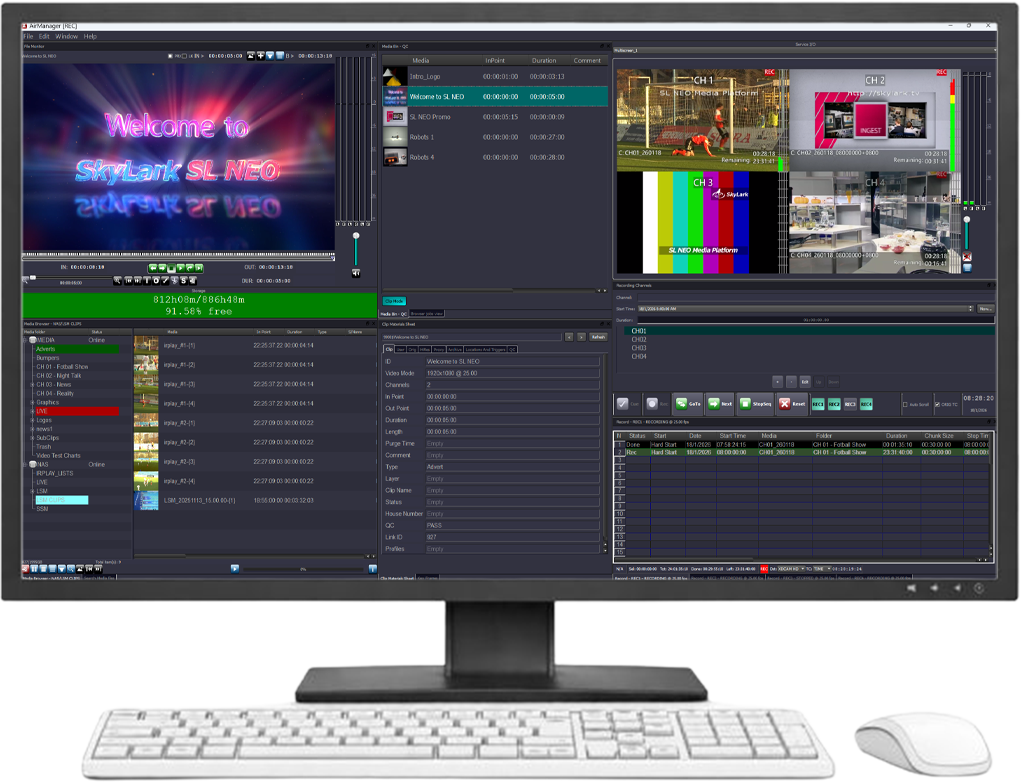
Overview
SL NEO Capture & Ingest is a high-performance, software-defined broadcast capture and ingest platform for multi-channel recording of live video across broadcast, production, news, sports, and OTT workflows. It supports SDI, ASI, SMPTE ST 2110, NDI, SRT, RIST, RTMP, Zixi, HLS, and other professional video sources within a unified recording environment.
A single server can record up to 24 HD or 4 UHD channels simultaneously, with support for synchronized multi-camera workflows, multiple codecs and containers, compressed stream passthrough, proxy generation, and real-time format conversion.
Recorded media is available immediately while recording is still in progress, enabling fast editing, playout, QC, archiving, and distribution workflows. As part of the SL NEO Media Platform, Capture & Ingest integrates with media management, Transfer Manager, Media QC, playout, and automation tools to create unified ingest and content-processing workflows.


Highlights
Multi-Channel Live Ingest
Codec & Container Support Codecs:
▸ DV, DVCPRO, MPEG-2, XDCAM, H.264, XAVC, AVC-Intra, AVC-Ultra, HEVC, DNxHD, DNxHR, ProRes
Containers:
▸ MXF (D10, OP-Atom, OP-1A, OP-1B, XDCAM), MOV, MP4, MPG, TS, AVI
Key Features
- Ingest & Recording Capabilities
- ▸ Multi-channel ingest from a single server
- ▸ Up to 24 HD or 4 UHD simultaneous recording channels
- ▸ Recording without re-encoding (compressed passthrough)
- ▸ Simultaneous recording in multiple codecs and containers
- ▸ Continuous 24/7 recording with clip creation
- ▸ Instant access to files while recording
- Processing & Media Transformation
- ▸ Low-resolution proxy creation in real time
- ▸ On-the-fly frame-rate, resolution, and format conversion, including SDR/HDR and color-space conversion
- ▸ Aspect ratio control with AFD support
- ▸ Audio channel remapping and mixing
- ▸ Audio input from multiple sources, including WDM, microphones, Dante/AES67, and IP streams, with configurable mixing and up to 60 s A/V offset for precise synchronization
- ▸ LOAS/LATM audio support for DVB workflows
- Input Formats & Signal Support
- ▸ SDI, ASI, SMPTE-2110, NDI, SRT, RIST, RTMP, Zixi, HLS, YouTube, Facebook, Twitch
- Subtitles & Ancillary Data
- ▸ Subtitle and VANC data handling: DVB-TTML, DVB bitmap subtitles, CEA-608/708, OP-42/47, MXF S436M
- ▸ Subtitle extraction and DVB-SUB bitmap OCR with conversion to SRT, supporting all languages
- Monitoring & Control
- ▸ Live previews over LAN and Web
- ▸ Real-time visual control of Playout and Ingest channels in the Multiscreen module
- ▸ System status monitoring in Air Manager with SNMP support for external monitoring systems
- Media Management & Editing
- ▸ Browsing, clip trimming, and fast collaborative proxy editing in the NewsCut NLE application, with content lifetime settings
- ▸ Content marking, including adding and storing keyframes and other attributes
- ▸ Integrated media database and metadata tightly integrated with playout, with support for external storage systems
- Control Interfaces & Integration
- ▸ Unified control of playout, graphics, and ingest channels, with flexible role-based access for different operators
- ▸ Desktop client, Web UI, hardware panels and remote control
- ▸ REST API and automation interfaces
- ▸ Router control for all major vendors
- Export & Workflow Automation
- ▸ Manual and automated exports
- Redundancy & Reliability
- ▸ Hot redundancy for parallel recording to Main and Backup servers from a single recording schedule
- Deployment
- ▸ On-prem, hybrid, and cloud deployment
Workflow
Recording Manager is a client-server system that controls automated recording workflows across multiple recorders and sources.
▸ Centralized scheduling and job management
▸ Parallel and sequential recording execution
▸ Automatic source switching via SDI router or IP control
▸ Main / Backup source switching for all supported input types
▸ Conflict detection and schedule verification
▸ Multi-user desktop and web-based operator UI
Recording tasks continue to run even if the client application is closed, as all schedules and jobs are managed server-side.
The Recording Manager application includes six functional windows:
▸ Recorder Status - displays all connected recording services (Recorders) and their status
▸ Recording Jobs - allows users to create, edit, and execute recording jobs for capturing media streams into files
▸ Schedule - designed for creating, editing, and executing time-based recording schedules, rather than user-triggered actions
▸ Weekly Schedule - displays recurring jobs in a weekly schedule view
▸ Upcoming - displays a list of upcoming events
▸ Recording Logs - displays a list with information about completed jobs


Depending on their position on the timeline, recording tasks may be executed either in parallel or sequentially. If tasks fully or partially overlap on the timeline, they are executed in parallel for the duration of the overlap. If tasks do not overlap in time, they are executed sequentially.
An example of sequential task execution is recording daily news bulletins from different broadcast channels where the bulletins air at different, non-overlapping times. Sequential execution allows significant savings in media server hardware and software resources. This is achieved by replacing static, configuration-level bindings between sources and recorders with dynamic switching of these connections when transitioning from one task to the next.
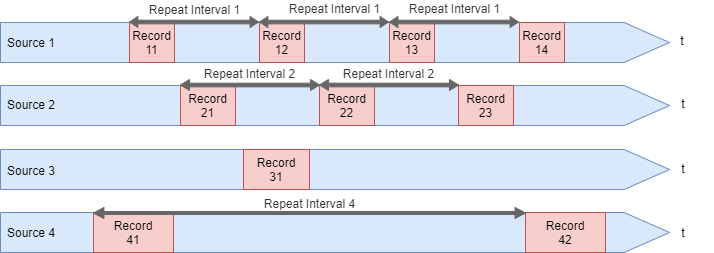
In real broadcast workflows, recording tasks often run in a mixed parallel–sequential mode. When sources are scheduled at different times, a single recorder can be reused sequentially. When multiple sources overlap in time, additional recorders are automatically engaged.
This approach optimizes hardware usage by dynamically allocating recorders based on the schedule. It is commonly used in broadcast environments with many external feeds connected via an SDI or IP router — often referred to as a Pathfire workflow — allowing dozens of sources to be recorded efficiently without dedicating a recorder to each one.

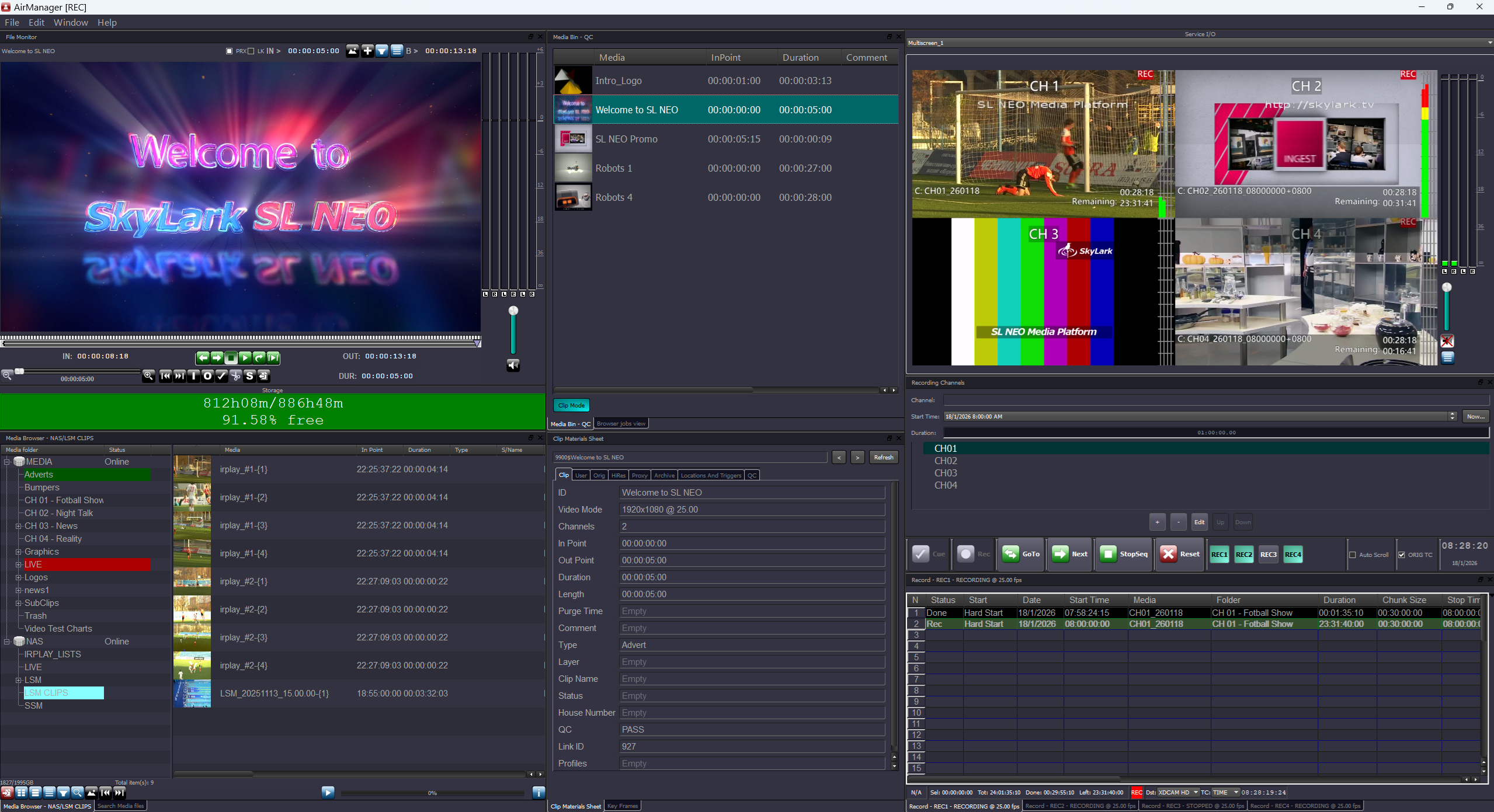
Continuous signal recording is performed in the Record window.
Recording control is handled in the File Monitor window.
Storage and management of recorded files are handled in the Media Bin window.

Integrated Ecosystem

SL NEO Capture & Ingest is fully integrated into the SL NEO Media Platform — a modular, software-defined environment where specialized modules work together in real time across one or multiple servers.
Additional modules — including Media QC, Transfer Manager, Program Player, and the SL NEO Base Module — can be combined to build a complete ingest, processing, and content-delivery workflow.
Use Cases
Technical Specifications
SYSTEM
| Chassis | 2U — 4U, dual hot-swap power supplies |
| CPU | 1 or 2 x Intel Xeon or AMD Epyc Series |
| Memory | 48 / 96 GB DDR4 |
| System Drive | SSD for OS |
| Network | 2 x onboard 1GbE |
| Storage | 4 to 12×3.5″ Enterprise HDD 4 to 24×2.5″ Datacenter SSD |
| OS | Windows Server |
Capture Ports & REC Channels
| Mode | HD/SD | Ultra HD |
| Capture Ports | 4 — 24 | 2 — 4 |
| REC Channels | 4 — 24 | 2 — 4 |
Video Formats & Color Spaces
| Formats | 625i/525i, 720p, 1080i/1080p, 2K, 2048×1080p, 2160p |
| Frame Rates | 25 / 29.97 / 50 / 59.94 / 60 fps |
| Color Spaces | BT.601 / BT.709 / BT.2020, SMPTE ST 2084, ARIB STD-B67 |
I/O Streams: Interfaces, Protocols, Codecs
| SDI | SDI 1.5G to 12G, embedded audio |
| IP (Broadcast) | SMPTE ST 2110, SMPTE ST 2022−7 |
| IP (Streaming) | NDI, HLS, RTMP, UDP, RTP, SRT, Zixi, RIST, MPEG-DASH, YouTube, Facebook, Twitch |
| DVB / ATSC IP | UDP / RTP, Unicast / Multicast, SPTS / MPTS |
| DVB / ATSC ASI | SPTS / MPTS |
| Video Codecs | MPEG-2, H.264, HEVC |
| Audio | 48 kHz / 16−24 bit PCM (SMPTE-302M), MPEG-1 Layer II/III, AAC, AC-3, E-AC-3 passthrough |
Input Ancillary & MPEG-TS Data
| Teletext / CC | OP-42 / OP-47 WST Teletext; CEA-608 / CEA-708 Closed Captions |
| Subtitles / EPG | DVB-TTML, DVB / ATSC subtitles, EPG; DVB-SUB bitmap OCR & SRT conversion (all languages) |
| MPEG-TS Audio | LOAS/LATM audio support for DVB workflows |
| Markers | SCTE-104 / SCTE-35 with metadata |
| VBI / VANC | VITC, AFD, WSS, record captions and VANC data into MXF S436M tracks |
Protocols & Device Support
| Monitoring | SNMP (SL NEO Software) |
| Hardware Panels | X-KEYS XK-24 / 60 / 80 |
| Automation | REST API, Router & GPI control |
File Containers
| MXF | OP-1A, OP-1B, D10, Avid OP-Atom |
| Sony | XDCAM HD/422, XAVC (50…480, Long GOP) |
| Panasonic | P2 AVC-Ultra (50…480, Long GOP) |
| General | AVI, MPEG PS/TS, MOV, DV DIFF, MP4, MPG, GXF |
Video/Audio Codecs (Recording to Files)
| SD / HD | DV25 DVCPRO25/50/HD100 HDV IMX 30/40/50 XDCAM EX SP/HQ XDCAM HD LP/SP/HQ/422 DNxHD 120/145/180/220 AVCHD XAVC 50/100/200 XAVC Long GOP AVC-Ultra 50/100/200 AVC-Ultra Long GOP ProRes HQ/SD/LT MPEG-2 I-Frame/Long GOP H.264 I-Frame/Long GOP |
| Ultra HD | H.264 8/10-bit XAVC 300/480 XAVC Long GOP AVC-Ultra 300/480 AVC-Ultra Long GOP ProRes SQ/HQ DNxHR SQ/HQ HEVC 8/10-bit |
| Audio | ADPCM, MPEG-1 L-I/II, AAC, AC3, E-AC3, WMA, FLAC, ALAC |
Recording Environments
| File Streams per Recorder | Two streams (Full Resolution + Proxy) |
| OS File System | File-based recording; normal or fragmented-file mode (array of files with configurable fixed duration) |
| SL NEO Media Database | Virtual clips (files + metadata), growing-file recording mode |
| Shared Storage | Avid Unity / Interplay |
| Mode | Single-channel, multi-channel, and synchronized multi-camera recording |
| On-the-Fly Processing | Frame rate, resolution, and field order conversion Interlaced / progressive conversion Aspect ratio handling with scale, crop, letterbox, and AFD support SDR / HDR color space conversion (BT.709, BT.2020, HLG, PQ) |
| Audio Processing | Channel re-mapping and re-mixing Loudness normalization Audio level control |
Hardware & Software Options
| Hardware Options | LTC Input (incl. supported LTC reader and software license: Adrienne AEC-4I, Plura PLC, Miranda Little Red, Horita TCI-50) GPIO (incl. supported USB GPIO and software license, up to 8 I/O ports: Ontrak ADU200, ADU2X8) GPU Board Increase Internal RAID Array Capacity 2x SSD in RAID-1 for System |
| I/O Interfaces & Boards | SDI / ASI — DekTec DTA-2172 / 2174B / 2175 / 2178 / 2179 / 2195 ASI / IP — DekTec DTA-2160 / 2162 with FEC Network — Mellanox ConnectX Video I/O — Matrox DSX LE3 / LE4, DataPath VisionRGB Capture — Blackmagic DeckLink Playout — Blackmagic DeckLink Other — Standard Ethernet, IEEE-1394, DirectShow |
| Additional Hardware Ports | SD / HD / 3 / 6 / 12G SDI, HDMI, ASI I/O ports NVIDIA ConnectX 10 / 25 / 40 / 50 / 100 / 200G ports for SMPTE ST 2110 / 2022−7 1G Ethernet ports for UDP / RTP IP with SMPTE 2022−1 FEC Standard 1 / 10G Ethernet ports for IP streams, control, file transfer RS-232 / 422 / 485, i-Link / IEE-1394 hardware ports AES I/O for Matrox DSX boards |
| Software Options | Transfer Manager PRO NVENC Assistance (for file encoding or output stream encoding) Avid Unity / Interplay Support (for REC channels) Web Application Server |
| Client Applications | Air Manager, Rec Manager, NewsCut |
| Additional I/O & Channels | Capture Port (SDI / HDMI, ASI / IP with DeMux and stream decoding, all supported protocols) Output Port (SDI / HDMI, ASI / IP with stream encoding, all supported protocols) MultiScreen Processor (4, 8, 16 or 24 inputs — software license) REC Channel (Full Resolution + Proxy) |
| Device Server Software Licenses | VDCP for REC Automation (Slave mode for single REC channel) SDI Router for REC Automation (for single device) VTR for REC Automation (for single device) TSL 5 UMD (Master mode for single device) |
| SDI Routers Control Protocols | Grass Valley Triton BDS Grass Valley NVision / Native Protocol / Vega / M-2100 Nevion VikinX V128 / Thor Leitch Imagine LRC Kramer ProBel SW-P-02 / SW-P-08 ELPRO SD2 HD Series BMD Videohub Ethernet / RS-232 Snell Switcher / Remote Protocol Evertz Quartz / EQM-2 Sierra XV Utah SC-4 / RCP-1 Venux VM / SI / 300 ASCII Ross Video Proemaster / NK-SCP/A AJA KUMO |
All product names, logos, and brands are property of their respective owners.