
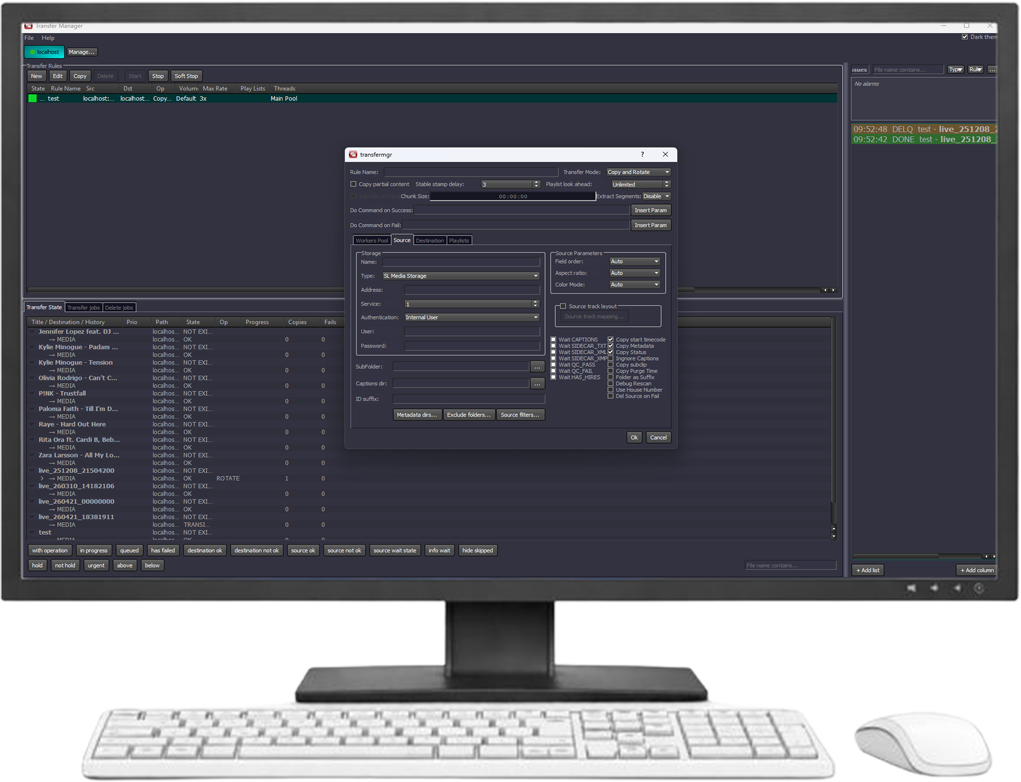
Overview
SL NEO Transfer Manager is a centralized media transfer and workflow automation platform for moving, routing, processing, and delivering content across broadcast, production, archive, and storage environments. It automates repetitive file-based operations and provides a unified interface for managing transfer queues, destinations, priorities, and processing rules.
The platform supports automated transfers between local and network storage, shared media systems, FTP/SFTP resources, and other connected destinations. Transfer tasks can include transcoding, format conversion, metadata handling, checksum verification, folder routing, and destination-specific processing conditions.
Transfer Manager can monitor source folders and storage locations, automatically detect new or updated media, and trigger predefined workflows without operator intervention. Queue management, priorities, scheduling, retry logic, and status monitoring help maintain predictable operation even in high-volume environments.
As part of the SL NEO Media Platform, Transfer Manager integrates with ingest, media asset management, QC, editing, archive, and playout workflows, enabling automated media movement and processing across a single facility or distributed infrastructure.
Highlights
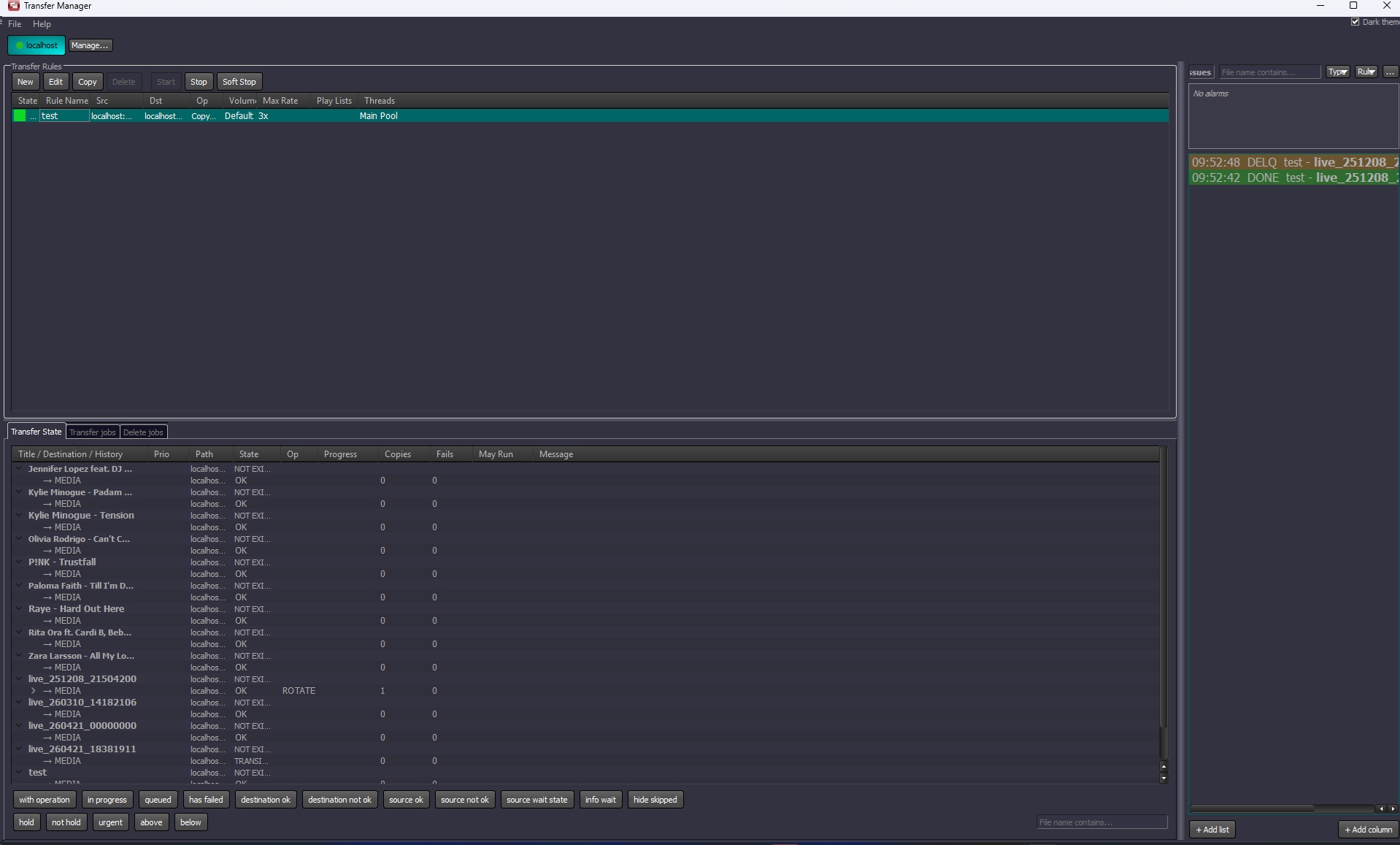
Flexible Queue Management
Key Features
- Media Transfer & Workflow Automation
- ▸ Automated file import, export, and synchronization across MAM, playout, archive, and NLE systems
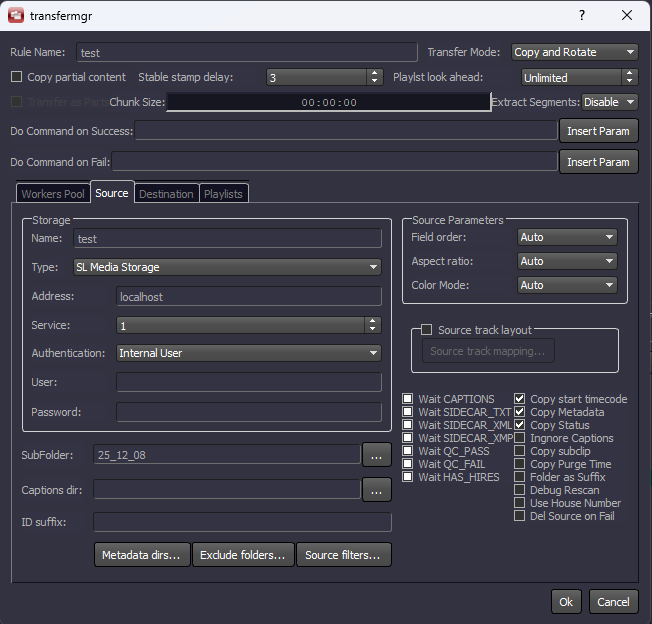
- ▸ Rule-based processing with flexible routing between multiple sources and destinations
- ▸ Watch folders for hands-free ingest from local, network, FTP, and production environments
- ▸ Playlist-aware transfer prioritization for on-air readiness
- ▸ Conditional transcoding rules based on source media parameters such as video mode, orientation, codec, and other metadata
- Transcoding & Rewrapping Engine
- ▸ High-performance transcoding across all major broadcast codecs and containers
- ▸ Instant rewrapping without re-encoding for lossless and ultra-fast delivery
- ▸ Frame rate, resolution, aspect ratio, and color space conversion (SDR/HDR)
- ▸ Simultaneous multi-format output generation for different workflows
- Wide Format & Standards Support
- ▸ Supports industry-standard codecs: MPEG-2, H.264, HEVC, DNxHD/HR, ProRes, XDCAM, AVC-Intra, and more
- ▸ Compatible with MXF (OP1A/OP-Atom), MOV, MP4, TS, AVI, MKV, GXF, and others
- ▸ Handles SD, HD, UHD, and multi-frame rate environments
- Advanced Audio & Caption Processing
- ▸ Loudness normalization (EBU R128 / LUFS / dBFS) and audio channel mapping
- ▸ Audio mixing, remapping, and dynamic range processing
- ▸ Full subtitles and captions workflow: CEA-608/708, Teletext, SRT, STL, TTML, EBU-XML
- ▸ VBI/ANC data extraction, conversion, and embedding
- Rendering & Content Processing
- ▸ Built-in rendering engine with overlays, logos, and watermarks
- ▸ EDL-based timeline rendering (NewsCut integration)
- ▸ Picture-in-Picture, text overlays, chroma key, and blur effects
- ▸ Merge multiple source files into one normalized output with format conversion, vertical-to-horizontal transformation, background blur, and other effects
- Multi-Destination Delivery
- ▸ Simultaneous delivery to multiple endpoints: storage, FTP, SL NEO servers, Avid Interplay
- ▸ Automated packaging for OTT and archive workflows (HLS, TS, MP4)
- ▸ Parallel export for ABR and multi-platform distribution
- Avid Interplay Integration
- ▸ Multi-volume Avid Interplay storage support
- ▸ Target output volume selection for rendering and media transfer
- ▸ Avid Interplay egress workflow support
- ▸ OP-Atom MXF file handling with Unicode names on Windows
- ▸ Source resolution support for P2, Avid, and Interplay media
- P2 Media Handling
- ▸ Support for P2 card-based media workflows
- ▸ Recognition of P2 cards stored individually or inside subfolder trees
- ▸ Transfer by individual P2 clips
- ▸ Whole-card transfer as a single combined asset
- ▸ Clip concatenation in original card order
- Real-Time & Growing File Workflows
- ▸ Edit-while-transfer support for growing files in shared storage environments
- ▸ Proxy generation in real time for immediate editorial access
- ▸ Optimized for live ingest, fast turnaround, and near real-time production
- Social Network Publishing
- ▸ Social media transcoding presets for broadcast content
- ▸ Square and vertical video output
- ▸ Low-bitrate MP4 and HLS file generation
- ▸ Automatic bitrate adjustment to match platform file size limits
- ▸ Parallel creation of broadcast master and social media versions
- System Integration & Control
- ▸ Full REST API for integration with MAM, QC, playout, and automation systems
- ▸ Client-server architecture with centralized control and monitoring
- ▸ Scalable deployment across distributed production environments
- Reliability & 24/7 Operation
- ▸ Designed for continuous operation in broadcast environments
- ▸ Content synchronization between main and backup systems
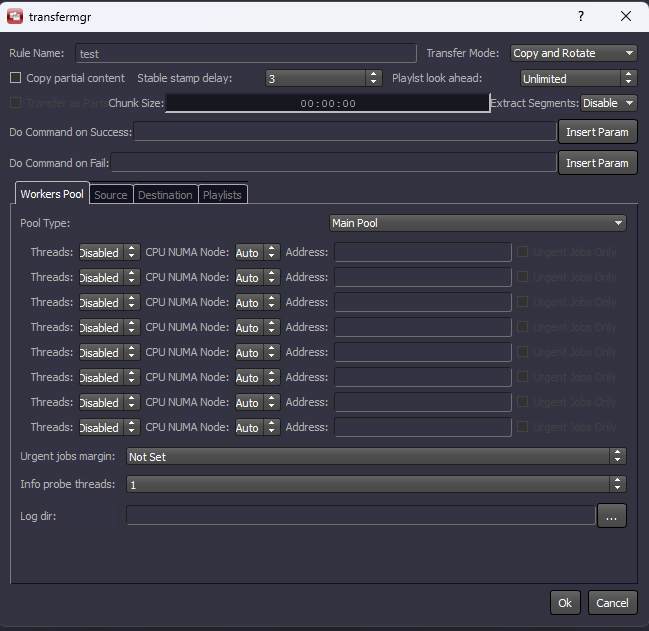
- ▸ Load balancing via configurable transfer threads and bandwidth control
Workflows
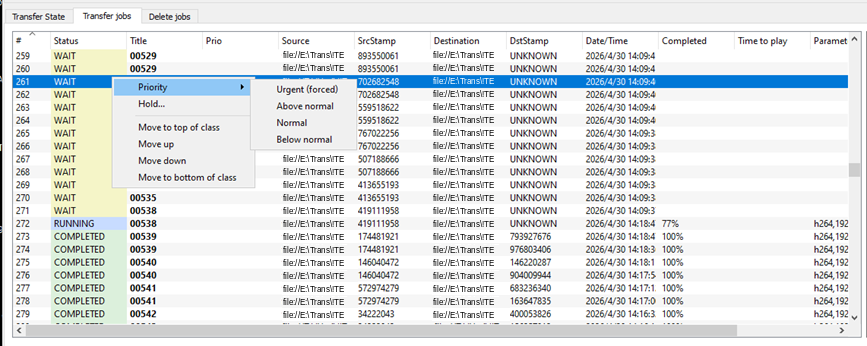
Priority levels for each file in the queue, with manual repositioning and drag-and-drop control — just like managing a playlist.
The panel aggregates all errors, stalled tasks, and system events across all transcoding rules simultaneously. It includes smart filters and sorting.

Transfer Manager includes three role-specific web interfaces for different operational scenarios. Transfer Dashboard is a browser-based status display optimized for video walls and newsroom monitors, requiring no additional setup. Editor View is designed specifically for editors and operators, providing access only to assigned processing rules. Transfer View offers a secure web interface for deeper operational control of Transfer Manager, allowing users to work with queues and logs without access to engineering-level settings.

SL NEO Transfer Manager allows users to submit media files for transcoding through a secure web portal. Remote journalists, editors, operators, or external contributors can simply log in from a workstation, laptop, mobile device, or even upload files received through messaging applications.
Uploaded media assets are automatically placed into the transcoding queue and processed according to predefined workflow rules. The system can convert files to the required house format, prepare them for further editing, publication, or playout, and deliver the processed result to the selected destination.
This workflow does not require access to shared storage, watch folders, VPN-mounted folders, or any other file-system sharing method. Users only need browser access to the Upload Gateway web interface, making the ingest process easier, safer, and more convenient for distributed production teams.
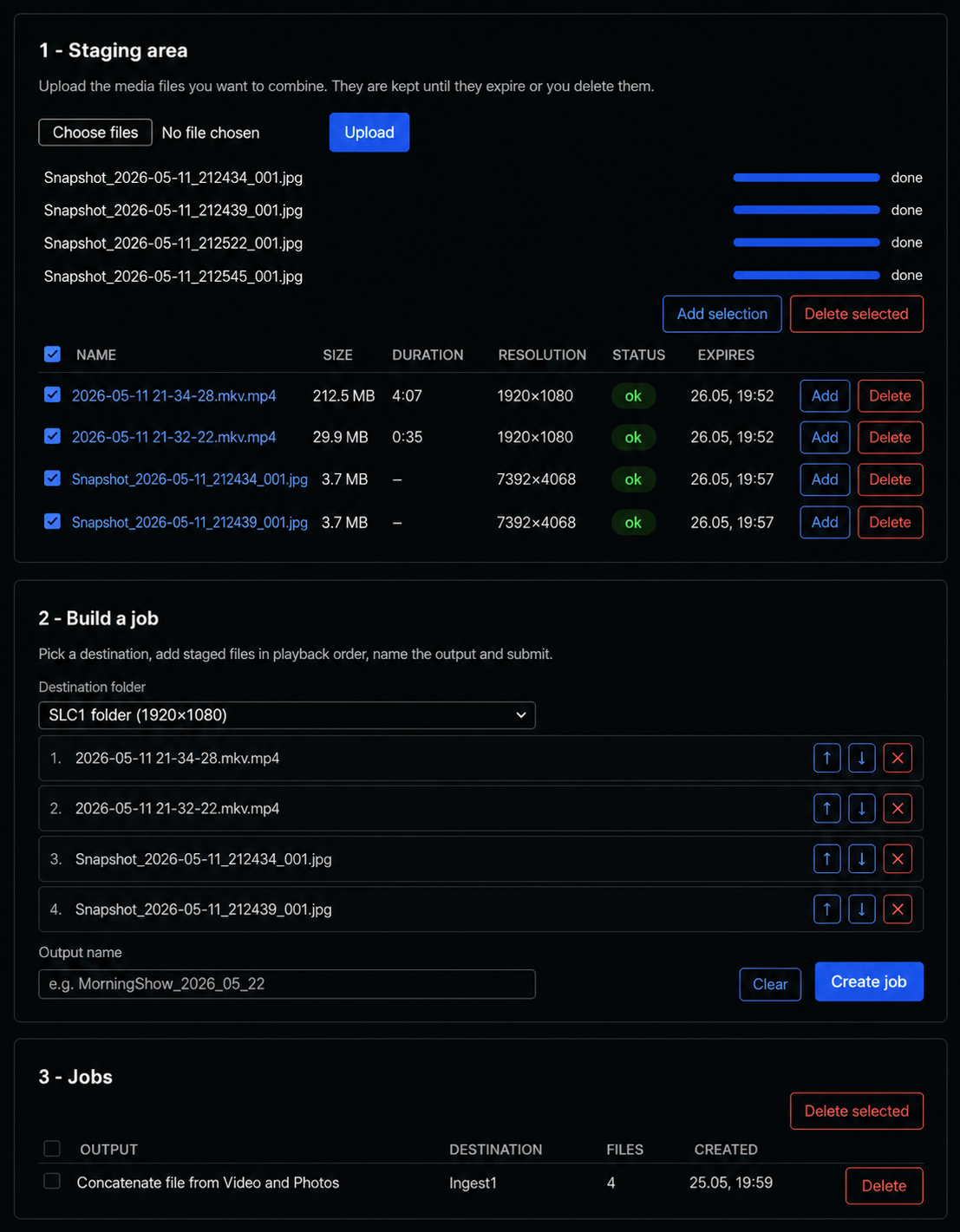
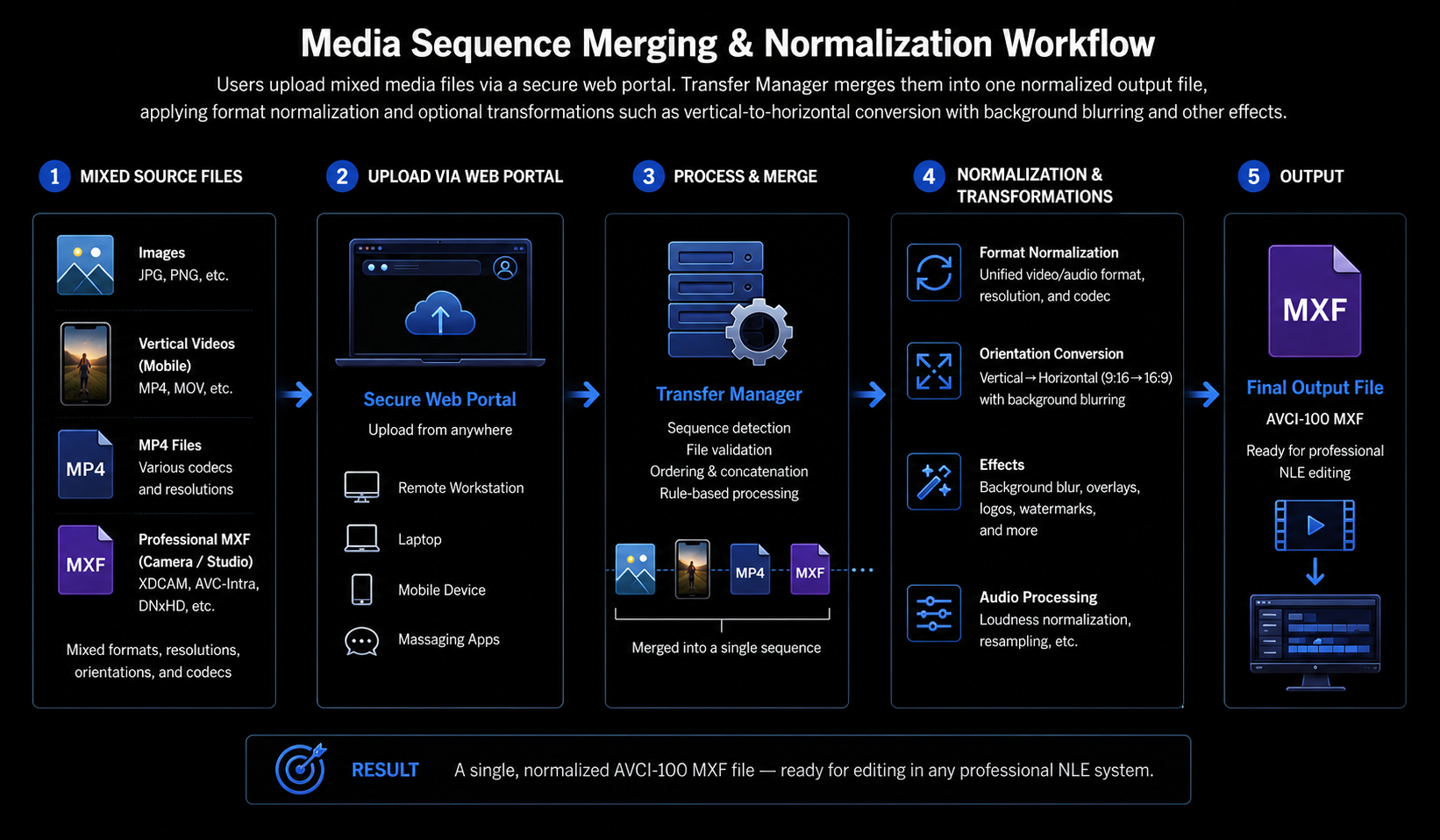
SL NEO Transfer Manager can merge a sequence of uploaded media assets into a single normalized output file. Users can submit mixed source materials through a secure web portal, including still images, vertical videos from mobile phones, MP4 files with different codecs and resolutions, and professional MXF files from camera or studio workflows.
After upload, Transfer Manager validates the files, orders them into a sequence, and concatenates them into one continuous media asset. During processing, the system normalizes the output format and can apply required transformations, such as vertical-to-horizontal conversion with background blur, format conversion, resolution adjustment, audio processing, overlays, logos, watermarks, and other effects.
As a result, a mixed set of incoming media files can be automatically converted into a single professional output file, for example an AVCI-100 MXF file ready for editing in a professional NLE system. This workflow is especially useful for newsroom and digital production teams working with materials from journalists, mobile devices, remote contributors, and different production sources.
Integrated Ecosystem
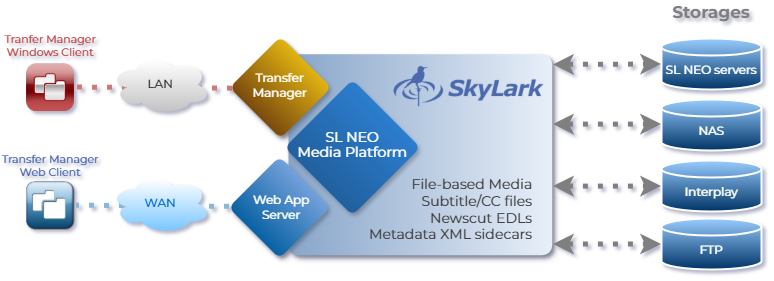
SL NEO Transfer Manager is fully integrated into the SL NEO Media Platform — a modular, software-defined environment where ingest, media management, processing, QC, archive, and playout modules work together in real time.
Additional modules — including iMAM, Media QC, Capture & Ingest, and the SL NEO Base Module — can be combined to build automated media-transfer and content-processing workflows across local, network, and distributed storage environments.
Use Cases
Technical Specifications
SYSTEM
| Processors | Intel® Xeon® Scalable and AMD Epyc Series |
| Memory | 32GB to 512GB |
| GPU | Nvidia Quadro RTX and Data Center series |
| OS Drives | 2 x 480GB SSD |
| Management | Web User Interface |
| Interfaces | Up to 32 x 3G-SDI/ASI or 8×12G-SDI 4 x 1GbE-T and/or 4×10GbE-T or 2×25G SFP28 |
| Power | Dual redundant power supplies |
| Dimensions | 1−4RU appliances |
Video Formats
| Containers | MXF-OP1A, MXF-D10 Avid MXF (OP-Atom) Sony XDCAM HD/422 (MXF-OP1A) Sony XAVC 50/100/200/300/480/Long-GOP (MXF-OP1A) P2 AVC-Ultra 50/100/200/300/480/LongG (MXF-OP1B) Microsoft AVI, MPEG PS/TS QuickTime MOV, DV DIFF MP4, MPG, GXF |
| Resolutions | 8192×4320, 4096×2160, 3840×2160, 2048×1080, 1920×1200, 1920×1080, 1440×1080, 1280×1080, 1280×720, 60×720, 1024×576, 720×576, 640×576, 504×576, 854×480, 720×480, 704×480, 640×480, 504×480, 640×360, 480×360, 360×288, 480×270, 320×240 |
| Scan Types | Interlaced and Progressive |
| Frame rates | 23.97/24/25/29.97/50/59.94/60 fps |
| Color Spaces | BT.601/709/2020 SMPTE ST2084 ARIB STD-B67 |
Captions and Subtitles
| Supported Formats | STL, SRT, SMI and TTML files 608/708 from MPEG2/H264 user bits C608/C708 tracks in MP4/MOV S436M track of MXF-OP1A |
Media Codecs
| Video | AVI, DVCAM, DVCPro 25/50/HD 100, HDV MPEG-2, MPEG-2 422 I-Frames/Long GOP XDCAM IMX-30/40/50, EX 25/35, HD 18/25/35, HD 422−50 H.264 420/422 I-Frames/Long GOP AVC-Intra 50/100, Ultra 200/300/480 LongG XAVC-S 420, XAVC-I/L 420/422 DNxHD 120/185/240/365 DNxHR-LB/SQ/HD/HQX ProRes HQ/LT/Proxy/4444 HEVC |
| Audio | AAC, AC-3, MPEG-1 L-I/II, MP3, Opus and 16/24-bit PCM, ADPCM |
| Graphics | Still: BMP JPG PNG PSD Targa TGA TIFFAnimated (with Alpha): TGA QTRLE (MOV) Hap Alpha (AVI, MOV) JPGA (AVI) PNG sequence |
Processing
| Video | Frame size conversion Frame rate conversion Deinterlacing and Interlacing SD/HD/UHD conversion Codec and bitrate conversion Color space conversion Aspect ratio conversion Cropping, Pilar and Letter box effects Super Black/white Clamp/Scale Timecode segmentation OTT packaging (CMAF, HLS, DASH) Noise Reduction Logo insertion Cropping Subtitle/CC and Timecode imprint |
| Audio | Sample rate conversion Codec and bitrate conversion Channel Mixing and Mapping Dynamic range conversion EBU R-128 Loudness Control Audio Level Adjustment Audio Offset Levels Nielsen watermark (includes CBET) |
| General | Watch folder automation Multiple target outputs Network Management Compliance checking REST XML API |
All product names, logos, and brands are property of their respective owners.