

Overview
SL NEO iMAM is a centralized media asset management platform for organizing, searching, previewing, and managing video, audio, graphics, documents, and metadata across shared broadcast and production storage.
The platform provides fast access to media through configurable metadata, proxy preview, filtering, search, collections, and user-defined asset organization. Operators can review content, update metadata, manage related media, and prepare assets for downstream production workflows from a unified interface.
iMAM integrates with ingest, editing, Transfer Manager, Media QC, archive, and playout workflows, helping teams maintain consistent media organization and shared access across multiple users, departments, and storage locations.
As part of the SL NEO Media Platform, iMAM can be deployed as a central content-management layer for broadcast facilities, newsrooms, production environments, archives, and distributed media operations.


Highlights
Centralized Media Library
Key Features
- Unified Media Repository
- ▸ Centralized database for all media assets
- ▸ Proxy, HiRes, and archival profiles
- ▸ Virtual and smart folders for organizational logic
- ▸ Asset shortcuts and metadata linking for efficient cataloging
- Metadata & Annotation
- ▸ Basic and extended metadata support
- ▸ Metadata imports/exports via XMP
- ▸ Rich annotation workflows including keyframes and segment markers
- Search & Discovery
- ▸ Full-text metadata search engine
- ▸ User-defined presets for frequently used queries
- Workflow Engine
- ▸ Triggers and statuses drive automated processing
- ▸ Configurable pipeline steps for ingestion, QC, review, and delivery
- ▸ Visual status markers streamline task progression tracking
- Multi-Format Ingest & Recording
- ▸ Ingest from VTR, file imports, automated recorders
- ▸ Supports a comprehensive set of codecs and containers
- Proxy & Special Copies
- ▸ Proxy copy generation for network editing and review
- ▸ Automatic generation of content copies for partner delivery, with watermark overlay for content protection.
- Subtitles & Captioning
- ▸ Import/export and management of subtitle tracks
- ▸ Preview and edit via integrated tools like NewsCut
- Archive & Backup
- ▸ Tape library integration and automated archival processes
- ▸ Scheduled backups for operational continuity
- Network Editing Support
- ▸ Enables proxy or full-res editing via NewsCut or external EDL workflows
- ▸ Direct export for systems like Adobe Premiere and Final Cut Pro
Workflow
It is an automated content synchronization and media transfer system that continuously replicates media files and metadata between servers, manages rule-based import/export and file movement, and performs transcoding and proxy generation to ensure efficient, balanced, and reliable media delivery across production and archive environments.
It works natively with SkyLark iMAM, enabling automated exchange of media and metadata, watch-folder processing, and seamless movement of assets between production and archive storage systems.
QC is an automated and manual media verification system that checks files against predefined test profiles, generates detailed reports and defect keyframes, and can trigger workflow actions based on results. It integrates with MAM and Transfer Manager to ensure only verified content proceeds through production and archive pipelines.
Built-in media database management interface providing access to content and virtual folders.
Frame-accurate content preview (Hi-Res, Proxy, SCTE, CC, ANC, multi-channel audio, external monitor output, marking/segmentation).
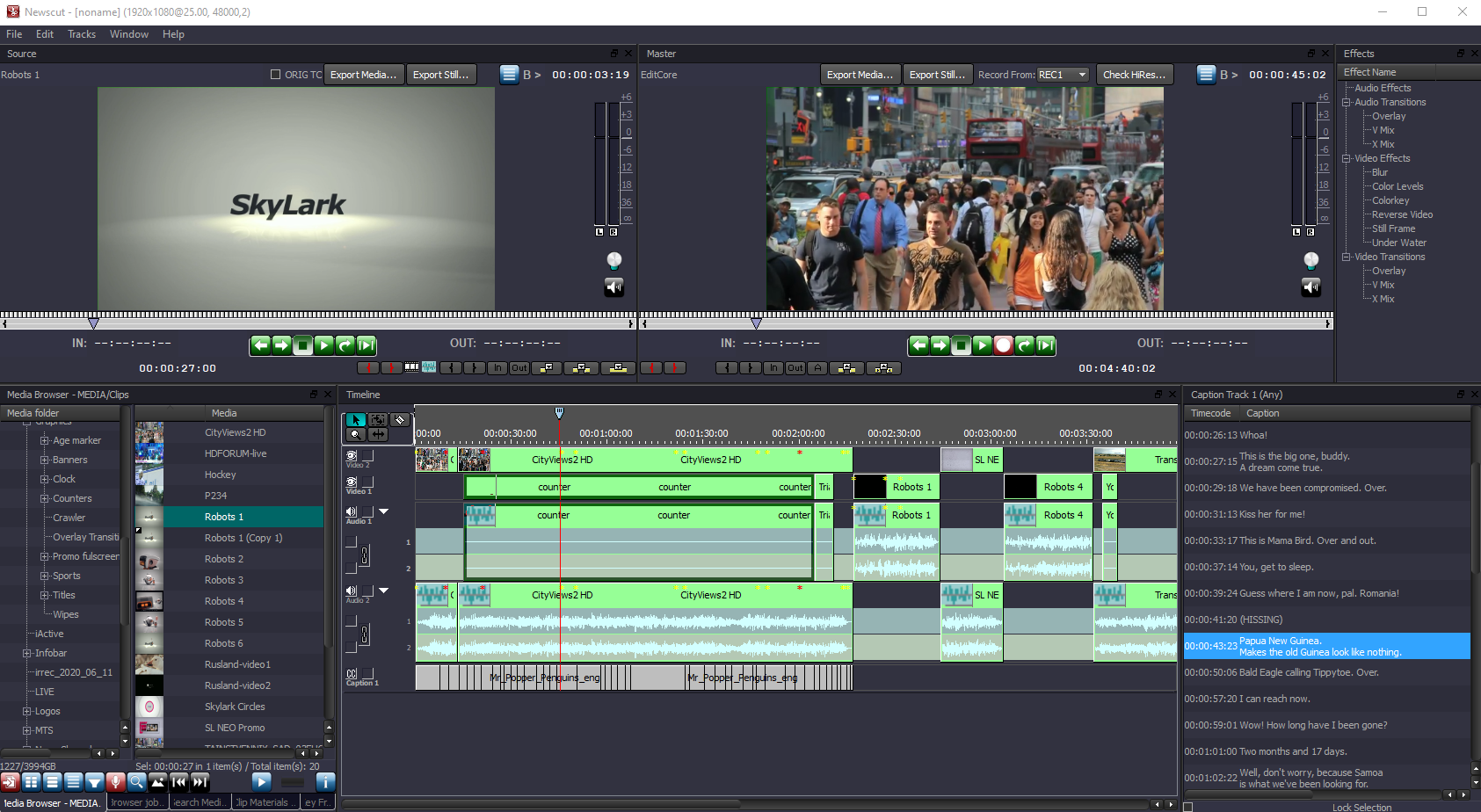
NewsCut is an application designed for rapid creation of news stories and programs from source clips stored in the iMAM. The system enables fast selection and assembly of materials, supports editing of clips that are still being recorded, and allows proxy-based editing for improved performance. It also provides EDL preparation for transferring projects to external editing workstations for final post-production.
Web Access to iMAM provides secure remote browser-based access to media assets, metadata, and virtual folders, enabling different user roles to search, preview, and manage content from any location without any additional software installation.
Integrated Ecosystem

SL NEO iMAM is fully integrated into the SL NEO Media Platform — a modular, software-defined environment where ingest, media management, transfer, QC, archive, editing, and playout modules work together in real time.
Additional modules — including Capture & Ingest, Transfer Manager, SkyLark Newsroom, and the SL NEO Base Module — can be combined to build centralized media-management and content-processing workflows across shared and distributed storage environments.
Use Cases
Technical Specifications
SYSTEM
| Chassis | 1U — 4U, dual hot-swap power supplies |
| CPU | 1 or 2 x Intel Xeon or AMD Epyc Series |
| Memory | 48 / 96 GB DDR4 |
| System Drive | SSD for OS |
| Network | 2 x onboard 1GbE |
| Storage | Built-in RAID-10, 4 or 8 x SAS 3.5″ RE drives (4 or 8 TB), useful capacity |
| OS | Windows Server |
Video Formats & Color Spaces
| Formats | 625i/525i, 720p, 1080i/1080p, 2K 2048×1080p, 2160p |
| Frame Rates | 25 / 29.97 / 50 / 59.94 / 60 fps |
| Color Spaces | BT.601 / BT.709 / BT.2020, HDR: SMPTE ST 2084, ARIB STD-B67 |
Protocols & Device Support
| Logging & Monitoring | Technical Logs, SNMP Monitoring |
| Automation | Neovid Storage REST API Neovid MEDB REST API Storage XML-RPC API |
iMAM Environments
| Deployment Options | On-Premises, Hybrid, Cloud, Modular or Full Suite Integration |
| Control Interfaces | Desktop client, Web UI, API |
File Containers
| MXF | OP-1A, OP-1B, D10, Avid OP-Atom |
| Sony | XDCAM HD/422, XAVC (50…480, Long GOP) |
| Panasonic | P2 AVC-Ultra (50…480, Long GOP) |
| General | AVI, MPEG PS/TS, MOV, DV DIFF, MP4, MPG, GXF |
| Other | Non-standard video, audio and photo files from non-professional sources such as consumer cameras, mobile devices, and social networks |
Video/Audio Codecs
| SD / HD | DV25 DVCPRO25/50/HD100 HDV IMX 30/40/50 XDCAM EX SP/HQ XDCAM HD LP/SP/HQ/422 DNxHD 120/145/180/220 AVCHD XAVC 50/100/200 XAVC Long GOP AVC-Ultra 50/100/200 AVC-Ultra Long GOP ProRes HQ/SD/LT MPEG-2 I-Frame/Long GOP H.264 I-Frame/Long GOP H.265 AV1 and other** |
| Ultra HD | XAVC 300/480 XAVC Long GOP AVC-Ultra 300/480 AVC-Ultra Long GOP ProRes SQ/HQ DNxHR SQ/HQ H.264 AVC 8/10-bit H.265 HEVC 8/10-bit AV1 and other** |
| Audio | ADPCM, MPEG-1 L-I/II, AAC, AC3, E-AC3, WMA, FLAC, ALAC and other** |
* Remote connection security is ensured by the security policy and IT infrastructure of each individual newsroom.
** For information on specific codec support, please contact us.
Adobe Premiere is a registered trademark of Adobe Inc.
Other product names are trademarks of their respective owners.