
Overview
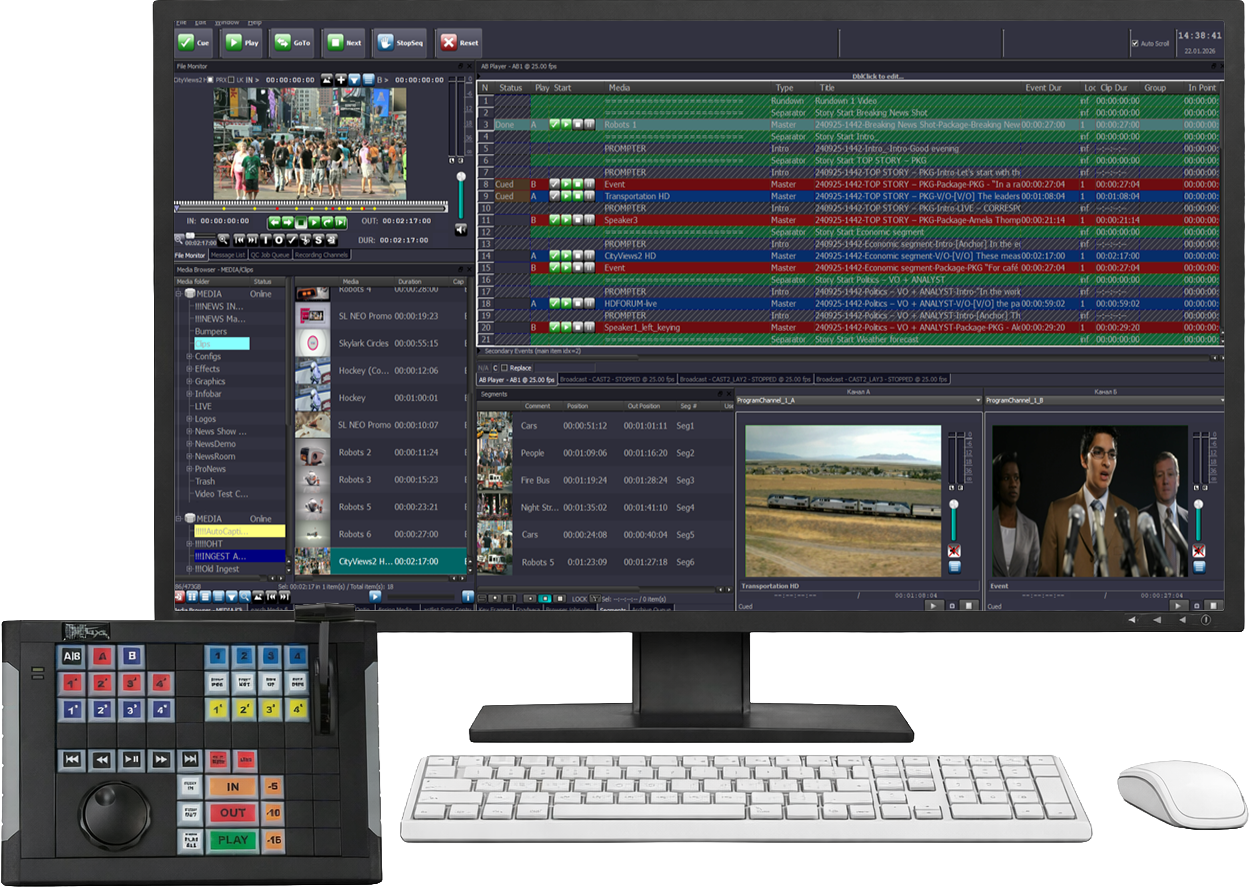
SL NEO Studio A/B Player is a professional dual-channel playout platform designed for live studio, newsroom, talk show, and production workflows. It provides independent A/B playback channels for fast cueing and seamless switching between clips, allowing operators to prepare the next item while another source is on air.
The platform provides frame-accurate playback control, instant clip loading, preview monitoring, playlist operation, and variable-speed playback for slow-motion workflows. Operators can quickly access and play media during live production using an interface optimized for time-critical studio operation.
Studio A/B Player integrates with newsroom systems through MOS workflows, allowing clips and media prepared by editorial teams to become immediately available to studio operators. It can also work with growing files and newly ingested media for fast-turnaround news and live production.
As part of the SL NEO Media Platform, Studio A/B Player integrates with ingest, media management, newsroom, graphics, and teleprompter workflows to provide coordinated playback across live studio and broadcast production environments.

Highlights
Dual-Channel A/B Playout
Key Features
- A/B Architecture
- ▸ Two independent playout channels (A and B)
- ▸ Pre-assigned or auto-selected output per rundown item
- ▸ Parallel preparation of upcoming clips during live playback
- Video Output Formats
- ▸ SDI
- ▸ SMPTE ST-2110
- ▸ NDI
- Rundown & Playback Control
- ▸ Instant preparation of rundown items
- ▸ Pause and scrubbing of individual items
- ▸ Playback progress and next-item visibility
- ▸ Hot-loading of new media files during live shows
- Media Handling
- ▸ Manual or automated media import
- ▸ Supports all common broadcast formats
- ▸ Video format conversion on the fly during playback or during import
- Hardware & External Control
- ▸ JLCooper SharpShot button panels
- ▸ X-Keys programmable panels
- ▸ GPIO signaling for tally and external automation
Workflow
Playlist automation controls two player outputs and enables playback in the traditional A/B style. The outputs can be monitored directly in AirManager using the Service Monitor displays, and when the A/B player preview is shown, Service Monitor provides the operator with playback controls, allowing them to also send commands such as play, stop, and pause from the monitor window.
Service monitor control buttons:
1. Play – starts playback
2. Pause – pauses or resumes playback
3. Stop – stops playback and pre-cues the next clip
Event triggering can be performed by:
1. Buttons in the toolbar
2. Control buttons in the Service Monitor windows
3. Buttons in the Start column
When a clip is being prepared or started on output A, the next clip is automatically queued for preparation on output B.


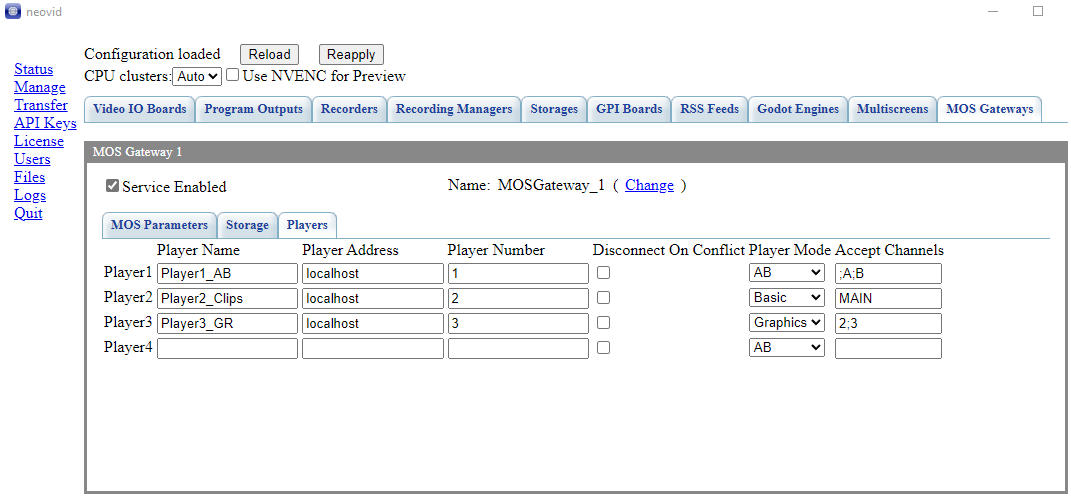
SL NEO Studio A/B Player can now be integrated into Newsroom workflows using the new MOS Gateway module. MOS Gateway interacts with NRCS software, turns the SL NEO Studio A/B Player into a MOS device, and enables the Storage, Program, Graphics Lists, and Prompter modules to communicate via the MOS protocol.
Supported features include:
▸ Media catalog synchronization
▸ Media asset status reporting to the NRCS
▸ Creation of filler clips
▸ Linking the Running Order to the AB player, basic playlist automation, graphics lists, and prompter
▸ Rundown item filtering based on the selected item player
▸ Rundown item status reporting to the NRCS
▸ Dynamic updates of playback duration for growing files
MOS integration has been tested and is fully operational with Octopus Newsroom and Arion S-News.

Integrated Ecosystem
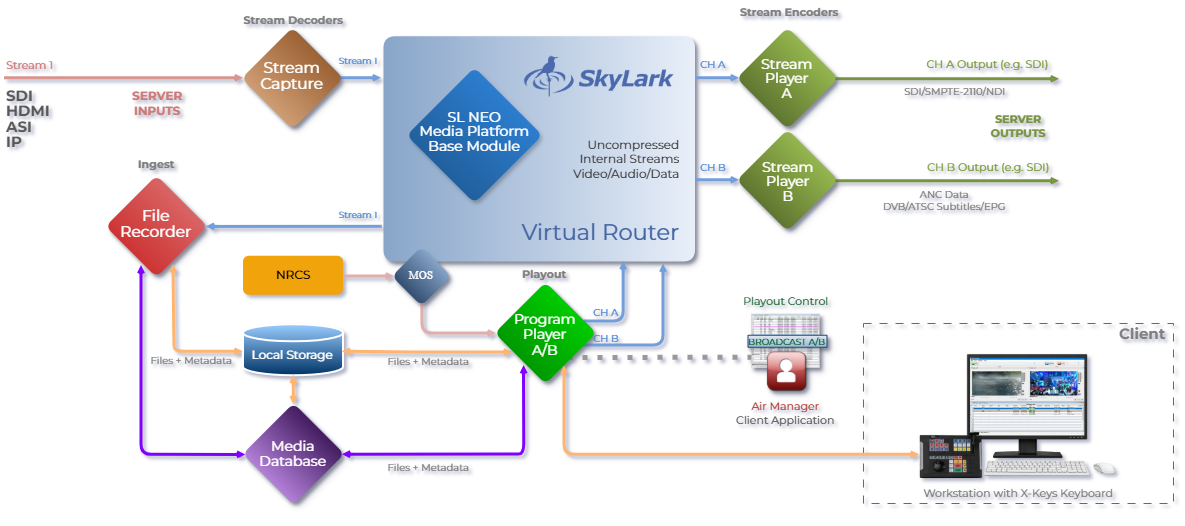
SL NEO Studio A/B Player is fully integrated into the SL NEO Media Platform — a modular, software-defined environment where newsroom, ingest, media management, graphics, and studio playback modules work together in real time.
Additional modules — including SkyLark Newsroom, Capture & Ingest, Broadcast Graphics, and TelePrompter — can be combined to build complete live studio and newsroom production workflows.
Use Cases
Technical Specifications
SYSTEM
| Chassis | 1U — 4U, dual hot-swap power supplies |
| CPU | 1 or 2 x Intel Xeon or AMD Epyc Series |
| Memory | 48 / 96 GB DDR4 |
| System Drive | SSD for OS |
| Network | 2 x onboard 1GbE |
| Storage | Built-in RAID-10, 4 or 8 x SAS 3.5″ RE drives (4 or 8 TB), useful capacity |
| OS | Windows Server |
ENVIRONMENTS
| Rundown Control | MOS-based |
| Cue/Playback Latency | Instant |
| Media Conversion | Real-time or during import |
| Control Interfaces | Desktop client, Web UI, API |
CHANNELS
| Output Channels | Dual (A/B) |
PROTOCOLS & DEVICE SUPPORT
| Monitoring | SNMP (SL NEO Software) |
| Hardware Panels | X-KEYS XK-24 / 60 / 80, XKE-64 Jog T-Bar |
| Automation | REST API, Router & GPI control, Schedule, MOS Integration |
VIDEO FORMATS & COLOR SPACES
| Formats | 625i/525i, 720p, 1080i/1080p, 2K 2048×1080p, 2160p |
| Frame Rates | 25 / 29.97 / 50 / 59.94 / 60 fps |
| Color Spaces | BT.601 / BT.709 / BT.2020, HDR: SMPTE ST 2084, ARIB STD-B67 |
I/O STREAMS: INTERFACES, PROTOCOLS, CODECS
| SDI | SDI 1.5G to 12G, embedded audio |
| IP (Broadcast) | SMPTE ST 2110 |
| IP (Streaming) | NDI |
All product names, logos, and brands are property of their respective owners.