
Why a Unified Broadcast Platform?
Broadcast workflows rarely stay as simple as they start. A project may begin with automated playout for a single TV channel, but as operations grow, so do the requirements: ingesting and recording live feeds, preparing content, managing media assets, adding broadcast graphics, and monitoring signal quality.
When each task relies on a separate system, broadcasters face additional challenges in integrating applications, exchanging media, managing different formats, and maintaining connections between systems. This can increase operational complexity, manual work, and infrastructure costs.
The SL NEO Media Platform from SkyLark brings these workflows together in a unified, modular software environment. Broadcasters can start with the capabilities they need today and expand their systems as production requirements and business operations grow.
Start with One Workflow. Expand When You Need To.
There is no need to implement an entire broadcast infrastructure from day one.
For example, a broadcaster can start with SL NEO Multi-Channel Playout to automate TV channel operations, combining file-based and live content, broadcast graphics, and subtitles in a single playout workflow.
As requirements evolve, the same platform can be extended with additional modules for signal ingest and recording, automated media processing, media asset management, and monitoring.
This modular approach helps broadcasters distribute investments across project stages, select the functionality that matches their current needs, and retain the flexibility to expand their infrastructure over time.
Connect Live Sources, Media Assets, and Production Workflows
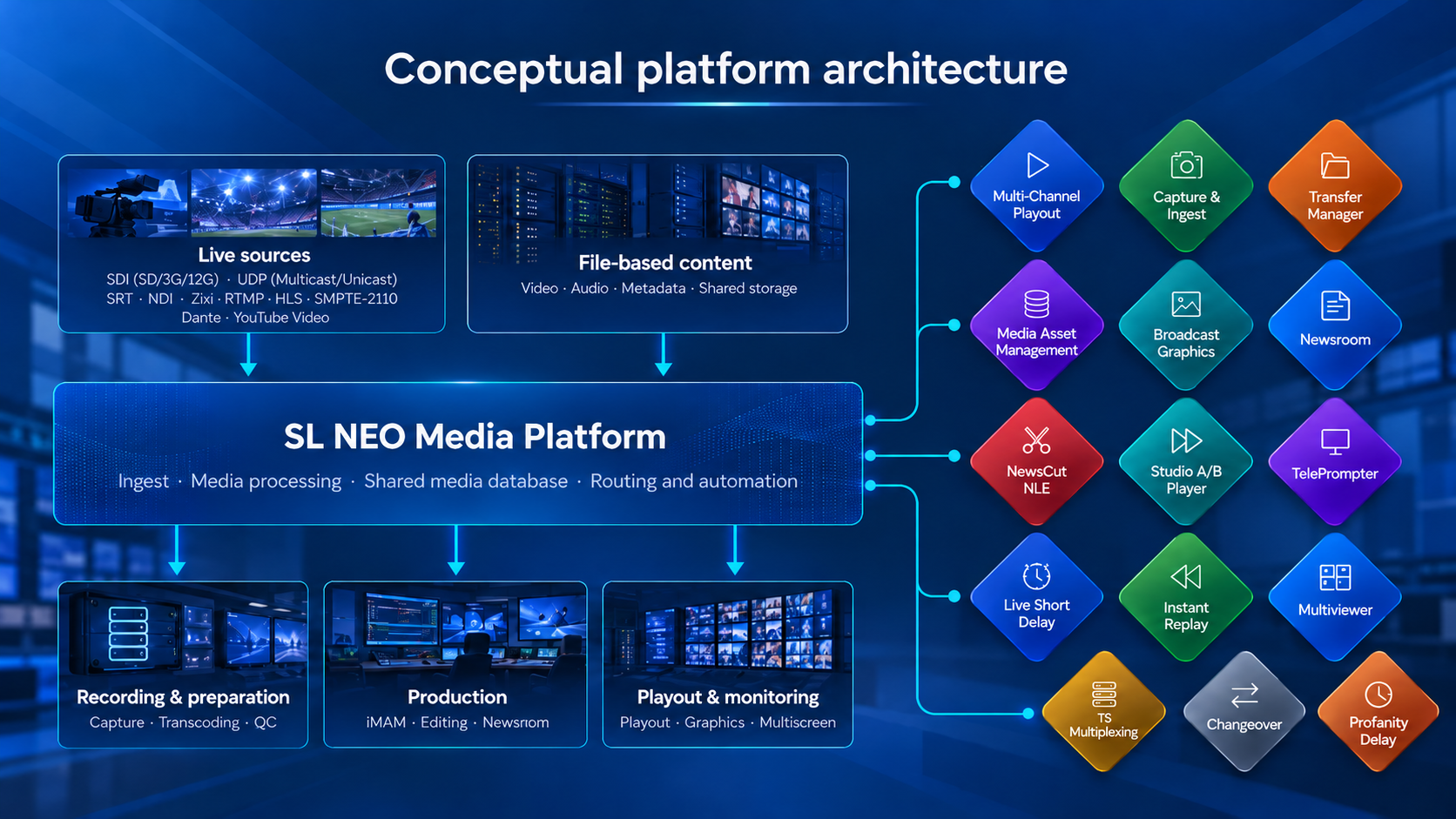
One of the key advantages of the SL NEO platform is its shared media-processing environment.
A live signal connected to the platform can be used across multiple workflows. Depending on the system configuration and routing, it can be recorded, sent to playout, processed, or displayed on a multiviewer without building separate signal paths for every application.
The same principle applies to file-based content.
Media files and metadata stored in a shared media database can be accessed for searching, previewing, editing, and playout preparation. Production teams can work with the same media assets without repeatedly transferring files between disconnected systems.
This helps reduce manual content handling, simplify collaboration, and maintain consistency throughout the production and broadcast chain.
Planning a new workflow or modernizing an existing system?
Discuss your requirements with the SkyLark team and find the right SL NEO configuration.
Build Different Broadcast Workflows on a Common Platform
SL NEO modules can be combined to support a wide range of broadcast and media production operations, including:
- 24/7 automated multi-channel playout
- Newsroom and studio production
- Live sports production and instant replay
- Media ingest, transcoding, and asset management
- Regional content and advertising insertions
- Live broadcast delay and content moderation
- Multi-channel monitoring and signal quality control
For example, an incoming live feed can be recorded, made available for editing, and prepared as a finished news package for an automated playout playlist.
In another scenario, an incoming television channel can be delayed to allow operators to review and modify sensitive content before the signal is released for distribution.
These workflows use different combinations of modules, while sharing a common technological foundation. The system configuration and connections between modules are determined by the specific requirements of each project.
Support Multiple Broadcast Formats and Automate Media Preparation
Modern broadcast environments must handle content from different sources, in different formats, and over different transmission interfaces.
SL NEO supports video formats from SD to UHD, along with a broad range of professional broadcast interfaces and protocols, including SDI, ASI, SMPTE ST 2110, NDI, UDP, SRT, RIST, RTMP, and HLS.
The available inputs and outputs depend on the selected software modules, hardware configuration, and project requirements.
For file-based workflows, SL NEO can automate media preparation and transcoding into a standardized production format, often referred to as the house format.
Automated processing rules can be used to normalize codecs, containers, resolutions, frame rates, and aspect ratios. For example, vertically oriented video can be adapted for horizontal broadcast output with a blurred background.
By applying predefined processing rules, broadcasters can reduce repetitive manual operations and make incoming content easier to integrate into their production and playout workflows.
Modernize Your Broadcast Infrastructure with a Gradual Transition from SDI to IP
Moving from traditional SDI infrastructure to IP-based broadcasting does not necessarily require replacing an entire system at once.
SL NEO supports a phased transition to IP while maintaining compatibility with existing SDI equipment.
The platform enables SDI and IP-based technologies, including SMPTE ST 2110, NDI, HLS, and Zixi, to operate within shared production and broadcast workflows.
Broadcasters can continue using their existing SDI infrastructure while gradually introducing new IP sources, network-based production systems, and distribution workflows.
This approach can help reduce the complexity of migration projects, protect existing infrastructure investments, and support modernization at a pace aligned with operational and business requirements.
Scale from a Single Server to Distributed Broadcast Infrastructure
As the number of channels, sources, and users grows, SL NEO can be expanded with additional software modules, server resources, and storage capacity.
The platform supports configurations ranging from a single server to distributed multi-server environments, with on-premises, cloud, and hybrid deployment options.
Scaling is not limited to capacity. A broadcaster can also expand its operational capabilities by adding content production, centralized media preparation, or signal monitoring to an existing playout system.
Each solution can be designed according to the required performance, infrastructure architecture, and redundancy model.
Adapt the Platform to Your Specific Workflow Requirements
Not every broadcast project fits a standard configuration.
SkyLark can work with customers to evaluate project-specific requirements and discuss customized functionality, including specialized automation logic, third-party integrations, media-processing workflows, and operational controls.
This flexibility allows broadcasters and media organizations to build solutions around their actual production processes and continue developing them as business requirements change.
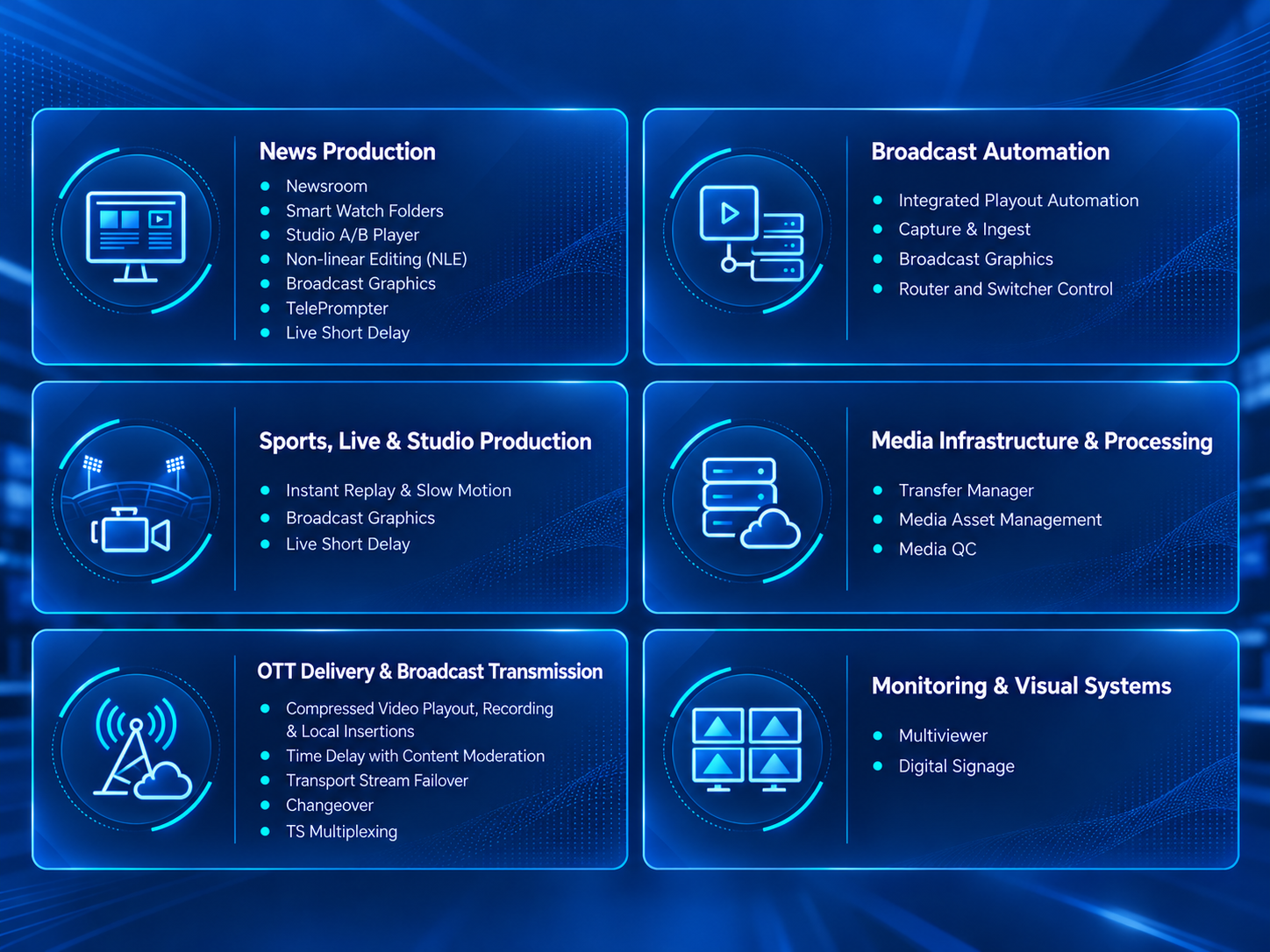
Six Core Areas of the SL NEO Media Platform
The SL NEO platform covers six major areas of broadcast production, media processing, transmission, and monitoring.
Modules can be combined to create project-specific workflows, and some products can serve multiple operational areas.
Explore the SL NEO Software Portfolio
News Production
From incoming media and newsroom planning to editing, studio playback, and on-air delivery.
- SkyLark Newsroom — Manages news stories, scripts, and rundowns while coordinating editorial preparation and newsroom-to-air workflows.
- SL NEO Transfer Manager for News — Automates incoming media ingest and processing through monitored folders, preparing content for newsroom production.
- SL NEO Studio A/B Player — Provides responsive video playback for live studio production, with control of A/B playback channels.
- NewsCut NLE — Enables network-based video editing directly from a shared media database, including editing recordings while they are still in progress.
- SL NEO Broadcast Graphics — Creates and plays out titles, lower thirds, tickers, and broadcast graphics with dynamically updated data.
- SL NEO TelePrompter — Displays presenter scripts with scrolling control and integration into newsroom workflows.
- SL NEO Live Short Delay — Introduces a short delay into live signals, giving operators time to review and react to content before it goes on air.
Broadcast Automation
From signal ingest to automated multi-channel playout with integrated graphics and subtitles.
- SL NEO Multi-Channel Playout — Automates multi-channel broadcasting through scheduled playlists, combining file-based content, live sources, broadcast graphics, and subtitles.
- SL NEO Capture & Ingest — Provides multi-channel signal ingest and recording for subsequent editing, playout, and archiving.
- SL NEO Broadcast Graphics — Adds channel branding, logos, titles, promos, and other graphic elements controlled directly from playout playlists.
- SL NEO SDI Router Controller — Controls SDI routing matrices and source switching within automated broadcast workflows.
Sports, Live & Studio Production
Instant replay, real-time graphics, and content control for live broadcasting.
- SL NEO Instant Replay & Slow Motion — Captures and plays instant and slow-motion replays, creates highlights, and prepares replay playlists during live sports and event productions.
- SL NEO Broadcast Graphics — Delivers live broadcast graphics, including titles, information overlays, and dynamically updated visual elements.
- SL NEO Live Short Delay — Adds a short safety delay to live transmissions, enabling operators to respond to unwanted content before it reaches viewers.
Media Infrastructure & Processing
Centralized media management, automated file preparation, and technical quality control.
- SL NEO Transfer Manager — Automates media transfer and processing, including transcoding, house-format normalization, and delivery to designated systems and storage locations.
- SL NEO iMAM — Provides centralized management of media assets and metadata, including browsing, searching, previewing, logging, and preparing content for production.
- SL NEO MEDIA QC — Performs automated technical quality checks on media files using configurable profiles and generates reports identifying detected issues.
OTT Delivery & Broadcast Transmission
Transport stream processing, regional insertions, content moderation, and broadcast redundancy.
- SL NEO Compressed Video Playout, Recording & Local Insertions — Supports playout and recording of compressed video streams, along with local program replacement and advertising insertion into distributed channels.
- SL NEO Time Delay with Content Moderation — Delays incoming signals to allow operators to review and modify sensitive or unwanted video, audio, and subtitle content before transmission.
- SL NEO Transport Stream Failover — Monitors transport streams and automatically switches to a backup source when defined signal problems are detected.
- SL NEO CHANGEOVER — Monitors primary and backup signals and controls source switching to help maintain broadcast continuity.
- SL NEO EASY MUXER — Provides transport stream multiplexing and processing, combining services and generating output streams for digital distribution.
Monitoring & Visual Systems
Centralized signal monitoring and content management across displays and video walls.
- SL NEO Multiscreen — Displays multiple video sources simultaneously, monitors video, audio, and technical signal parameters, and provides alerts when problems are detected.
- SL NEO Digital Signage — Manages and schedules content playback across information screens, digital displays, and video walls.
Build the Right SL NEO Configuration for Your Project
Whether you are launching a new TV channel, modernizing an existing broadcast facility, or expanding your media production workflows, SL NEO provides a modular foundation that can grow with your requirements.
Tell us what you need to accomplish today and how you plan to develop your infrastructure.
The SkyLark team can help you select the appropriate SL NEO modules and demonstrate how they can work together in your production or broadcast environment.
Let’s build the right SL NEO configuration for your project.
Share your workflow requirements and discuss the right combination of modules with the SkyLark team.